
AI Agent for Customer Support
Give the AI Agent approved knowledge, test its answers, and let it handle routine requests. Your team reviews what needs approval and takes over when judgment matters.
Book a demo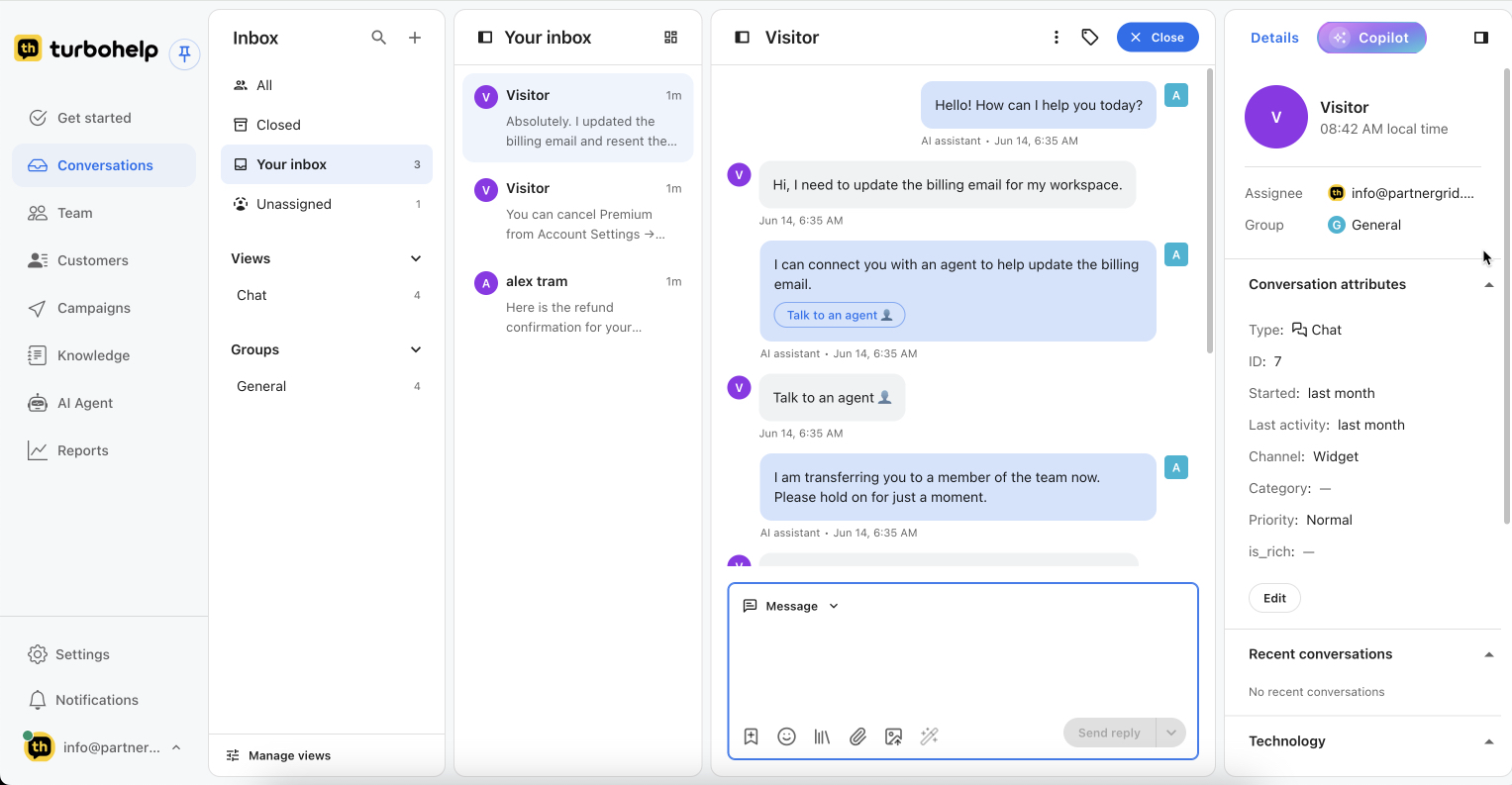
Product interface: a customer asks to change a billing email, the AI identifies that an agent is needed, and the conversation is transferred with context.
Control what the AI Agent can use before it replies
A useful support agent starts with maintained content and explicit boundaries, not unrestricted access to every internal source.
Choose approved knowledge
Start with customer-facing help center articles, product documentation, FAQs, and support answers that are current and safe to reuse.
Set access boundaries
Keep private, account-specific, or sensitive decisions outside automated answers unless the workflow is explicitly designed for them.
Test representative questions
Review expected answers, missing-answer behavior, source context, tone, and handoff outcomes before customer-facing use.
Review the basis for an answer
Grounding connects a reply to content the team approved. During review, the teammate should be able to inspect the relevant source context instead of treating the answer as unexplained output.
Password reset request
“I no longer have access to the email on my account. Can you reset it?”
Account recovery guide; identity verification is required before an email change.
Do not complete the account change automatically. Create or update the ticket and hand it to a teammate with the conversation summary.
Escalate the request without making the customer repeat it
Teams decide which requests need a person. Typical examples include billing changes, refunds, security issues, exceptions to policy, low-confidence answers, and cases requiring account verification.
Explore human handoffContext passed to the teammate
- Conversation history and channel
- Customer details available to the workspace
- AI summary and unresolved question
- Ticket status, priority, category, and owner
- Relevant approved knowledge used during the conversation
Connect AI decisions to accountable support work
When a request cannot be resolved in the conversation, it can continue as a ticket instead of disappearing into a separate bot transcript.
Create
Preserve the request as trackable work.
Classify
Apply the issue category and relevant context.
Prioritize
Flag urgency according to team rules.
Route
Move the work to the right owner or group.
Measure coverage and failure modes
Do not judge the AI Agent by activity alone. Review what it resolved, what it escalated, what it could not answer, and which content needs attention.
Explore AI support analyticsResolution
Requests completed without human intervention, reviewed for quality.
Escalation
Requests handed to people and the reasons behind them.
Unanswered questions
Topics where no suitable approved answer was available.
Content gaps
Recurring questions that should become or improve help content.
Keep humans responsible for judgment
The AI Agent should not make an unsupported promise, invent a policy, approve an exception, verify identity, decide a sensitive financial outcome, or continue when the available knowledge is unclear. In those cases, the right outcome is a visible limitation and human handoff.
Operational rule: automate only the cases the team can test, observe, and safely reverse.
AI Agent FAQ

Get your AI helpdesk today
Faster replies, smarter routing, and all customer conversations in one inbox.
Start free trial